The month-end close, from investigating to finishing.
The month-end close is the same work every month: reconcile the bank, match customer and supplier balances, post accruals, check balance sheet items and report. Easyclose automates that closing process to a large extent: a theme-based checklist your team builds itself, checks such as the balance sheet check and the intercompany current account that run automatically, reporting and consolidation that stand ready the moment you close, and a virtual controller (AI) that flags anomalies in your figures for you. The period close becomes faster, verifiable and traceable.
What is a month-end close?
A month-end close, also called a period close, is the fixed process a finance team follows to check, correct and finalise the accounts for the past month. The goal: figures you can build on. Only when the bank reconciles, the suspense accounts are empty and the balance sheet items add up are the profit and loss and the balance sheet reliable enough to send to the board or the bank.
A good financial closing process is predictable and repeatable. The same recurring tasks every month, the same checks, the same order. The tighter that rhythm, the sooner you are done and the fewer surprises sit in the figures. For groups with multiple companies it also includes the consolidation and the intercompany current account check.
Figures that are right
The month is only closed once the books balance internally: bank reconciled, suspense accounts empty, balance sheet items substantiated.
The same every month
A fixed order and fixed checks make the process predictable. Less investigating, less firefighting.
Ready to share
After the close comes the reporting: P&L, balance sheet, cash flow and, for a group, the consolidation, compared against last year or budget.
The closing process in 7 steps
A smooth closing process follows the same steps every month. This order works from coarse to fine: first reconcile the large money flows, then the detail items, and only at the end the reporting. That way you never build a report on figures that are still moving.
Reconcile bank and cash
All bank transactions posted and the balances equal to the statements. Clear suspense and clearing accounts, so no money falls through the cracks.
Match receivables and payables
Reconcile open items with the general ledger, investigate differences and clean up old items. This lays the foundation under your working capital.
Value stock and work in progress
Set stock levels and projects (WIP) at the right value and post the movements.
Payroll, accruals and depreciation
Process the payroll journal entry, accruals (holiday pay, bonuses, audit fees) and the monthly depreciation.
VAT and other suspense accounts
Check the VAT position and clear or substantiate the remaining suspense and clearing accounts.
Substantiate balance sheet items
Give every balance sheet item a substantiation (a specification or reconciliation). What you cannot explain is usually wrong.
Report and consolidate
Deliver the P&L, balance sheet and cash flow, compare with last year or budget and, for a group, consolidate with an intercompany current account that balances.
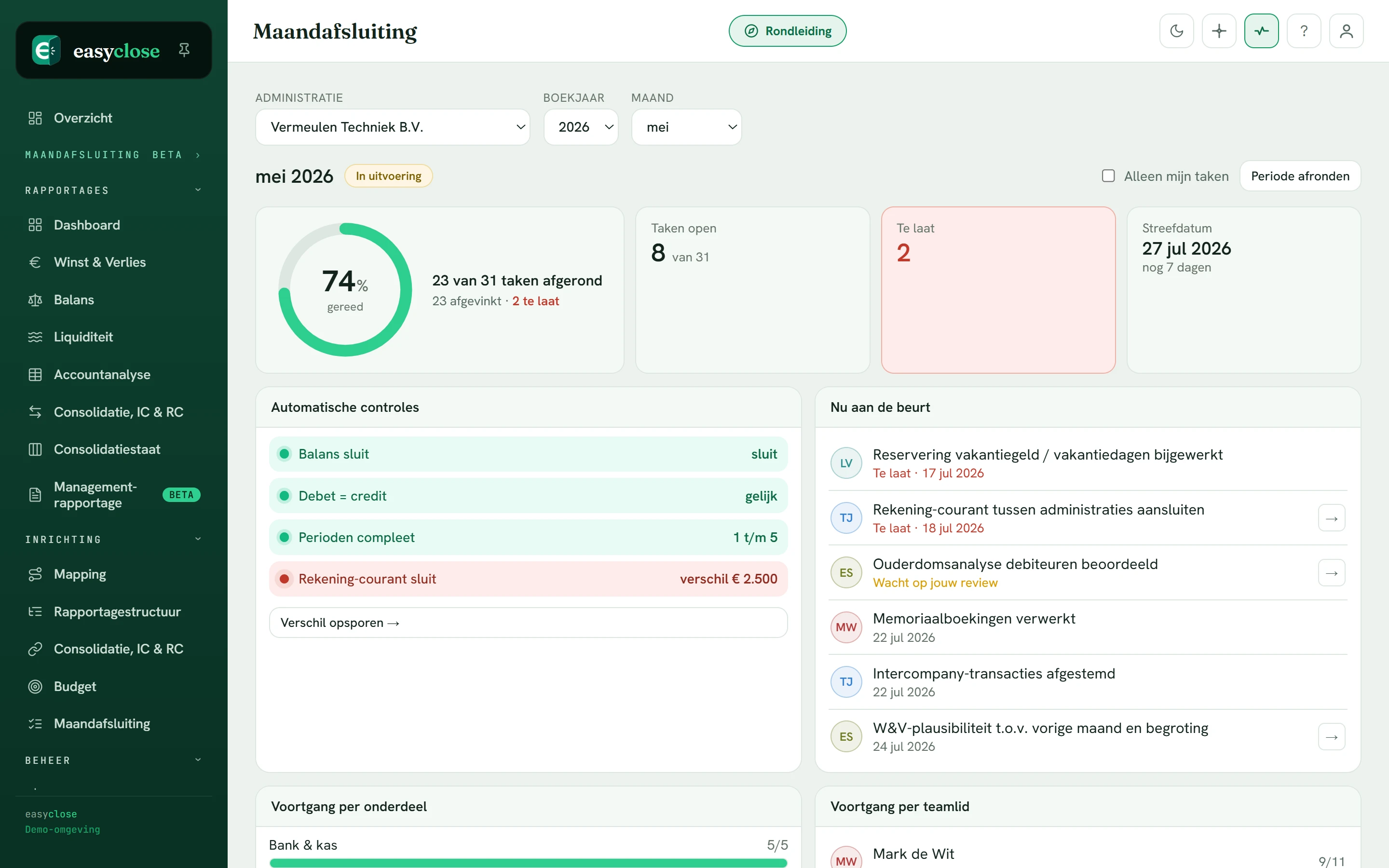
This step-by-step plan, but live
In Easyclose this plan is a shared checklist with owners, deadlines and checks that run automatically. This is the real screen, straight from the demo.
See it in the demo →The checklist for your month-end close
Many teams keep their month-end close checklist in Excel. That works, until it no longer does: no view of who is working on what, no version control and copying it over again every month. Below is a complete theme-based month-end close: the recurring tasks organised by theme. Adopt it as a starting point, or let your team build its own in Easyclose with owners, deadlines and status.
Bank & liquidity
- Bank transactions fully posted
- Balances equal to statements
- Suspense and clearing accounts empty
- Credit cards and cash reconciled
Receivables & payables
- Open items reconciled with the general ledger
- Payment differences investigated
- Old items cleaned up
- Prepayments correctly classified
Stock & projects
- Stock level valued
- Work in progress updated
- Margin per project checked
Payroll & staff
- Payroll journal entry posted
- Accruals for holiday pay/bonus
- Net wages matched
General ledger & journal entries
- Depreciation processed
- Accruals and deferrals
- VAT position checked
- Balance sheet items substantiated
Reporting & consolidation
- P&L and balance sheet delivered
- Compared with last year/budget
- Consolidation with intercompany check
- Report shared with the board
Month-end close software, or Excel after all?
Excel is a fine starting point, but it scales poorly. A tool for the closing process solves exactly the things loose lists fall short on: collaboration, overview and control. The difference is not in the tasks themselves, but in who does what, what is done and whether the figures really add up.
One truth, no versions
Everyone works in the same checklist with owners and deadlines. No more "which version is the latest?", and at a glance who is up next.
Checks that run along
The balance sheet check and the intercompany current account check run automatically. A difference is pointed out immediately, instead of at the financial statements.
Always explainable
Click from a report line back to the entry. Every item can be substantiated, for yourself, the board or the accountant.
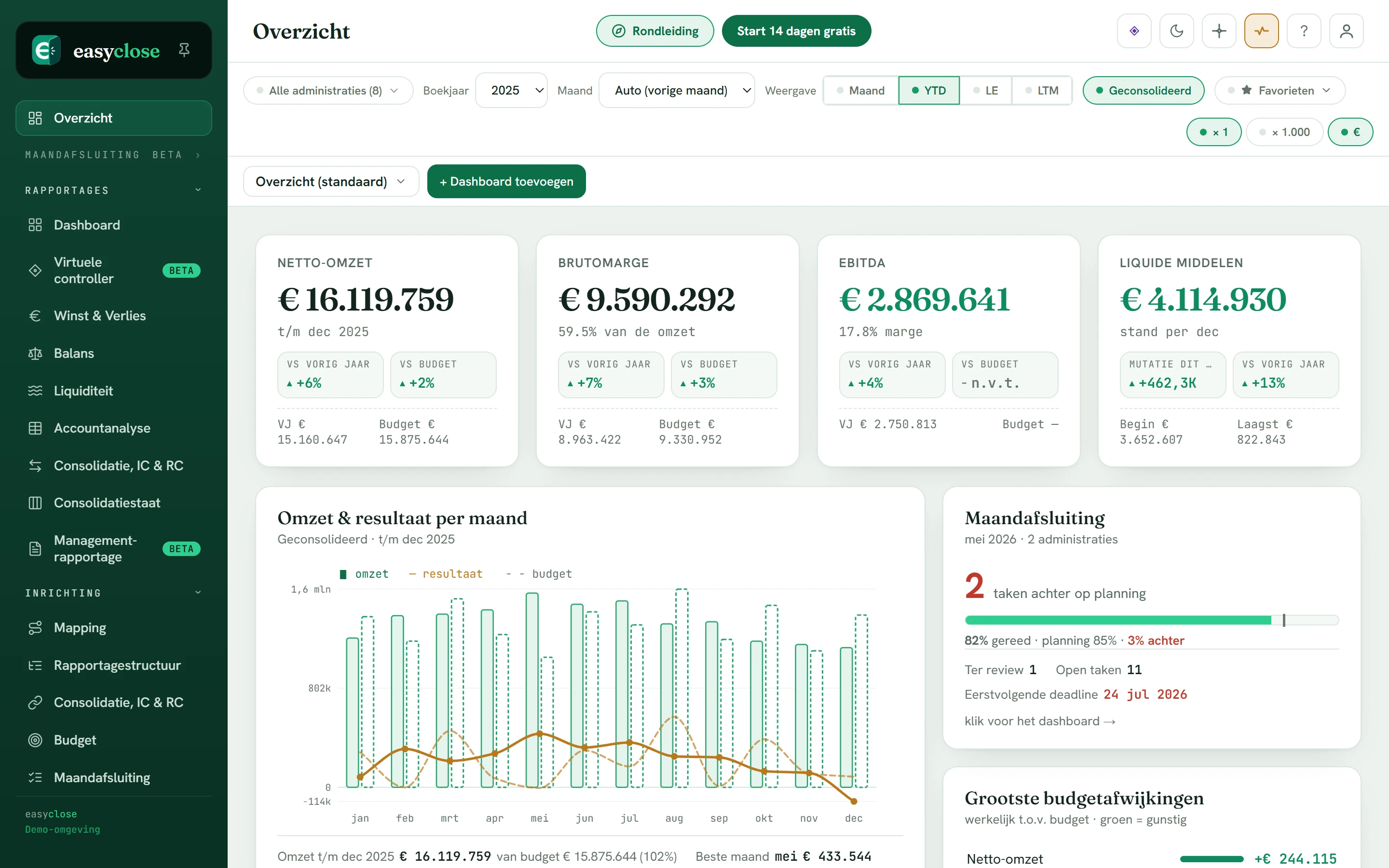
The reporting stands ready immediately
As soon as the month is closed, the dashboard, P&L and balance sheet stand ready, compared against last year or budget and with drill-down to the entry line.
See it in the demo →How Easyclose makes the month-end close easy
Easyclose is Dutch month-end close software, built by a controller. The close checklist and the figures sit in one place, you import from every accounting package and the checks run automatically. Operational within an hour, without an IT project or consultant.
Your team builds it itself
The dynamic close checklist is the heart of Easyclose: tasks, owners, deadlines and dependencies, with progress and bottlenecks at a glance. Every month afresh, without loose Excel lists.
Works with every package
Import your audit file (XAF) directly, or a free-form Excel or CSV where you map the columns yourself and save that profile. We roll out live connections package by package; the import always remains the fallback.
Dashboards, P&L, balance sheet
After closing, the dashboard, profit and loss, balance sheet and cash flow stand ready, compared against last year or budget and with drill-down to the entry line.
Group with intercompany check
Multiple companies? Put them in a group structure and consolidate with visible intercompany eliminations and an intercompany current account check that runs automatically.
EU hosting, strictly separated
Your data is stored encrypted within the EU (AWS Frankfurt). Every organisation sees only its own figures, enforced at database level.
MCP connection
Point your own AI at your figures via the MCP connection, with exactly the same access boundaries as you. The AI never sees more than the user is allowed to see.
Want to know more about the building blocks? See financial reporting, consolidation, compare & budget, building dashboards, the virtual controller or how we secure your data.
Frequently asked questions about the month-end close
What is a month-end close?
A month-end close (also called a period close) is the fixed process a finance team follows to check, correct and finalise the accounts for the past month, so the figures are definitive and reliable. Think of reconciling the bank, matching customer and supplier balances, posting accruals and depreciation, and checking balance sheet items. Reporting follows: profit and loss, balance sheet and, for a group, the consolidation.
How do you make the closing process faster and smoother?
A smooth closing process starts with a fixed, shared checklist with owners and deadlines, so everyone knows who is responsible for what. Work by theme (bank, receivables, payables, stock, payroll, general ledger, reporting) and let checks such as the balance sheet check and the intercompany current account run automatically instead of by hand in Excel. That shifts your time from investigating to finishing.
What belongs in a month-end close checklist?
A good checklist lists the recurring tasks per theme: reconcile the bank and clear suspense items, match customer and supplier balances, value stock and work in progress, post the payroll journal entry and accruals, process depreciation, check VAT, substantiate balance sheet items and finally deliver the reporting and, where relevant, the consolidation. Every task has an owner, a deadline and a status.
Can you run a month-end close without Excel?
Yes. Loose Excel lists work until they no longer do: no version control, no view of who is doing what and no automatic checks. Month-end close software puts the checklist, the figures and the checks in one place, with an audit trail. Easyclose imports your audit file or Excel and runs the balance sheet check and the intercompany current account check automatically.
Does Easyclose work with my accounting package?
Yes, with every package. You import an audit file (XAF) directly, or a free-form Excel or CSV where you map the columns yourself and save that profile for next time. We roll out direct live connections package by package; the import always remains available as a fallback, so you are never locked in to one vendor.
How quickly am I up and running?
With an import you are live within fifteen minutes; with a direct connection your data appears automatically. No implementation project, no consultant, no IT, you simply start. Want to look around first? The demo on this site runs on fictitious figures and requires no account.
Make your close the calmest week of the month
Open the demo with fictitious figures, or create a free environment and import your own audit file or Excel. See for yourself how the checklist, the reporting and the checks come together in one place.
- Theme-based close checklist your team builds itself
- Balance sheet check and intercompany current account check that run automatically
- Dashboards, P&L, balance sheet and cash flow that are right straight away
- Works with every accounting package via audit file or Excel
- Consolidation for groups with multiple companies
- EU hosting, strictly separated data, operational within an hour